Technical Issues - FilmStar News 2010
Other editions:
2006, 2007, 2008,
2009, 2011,
2012, 2013
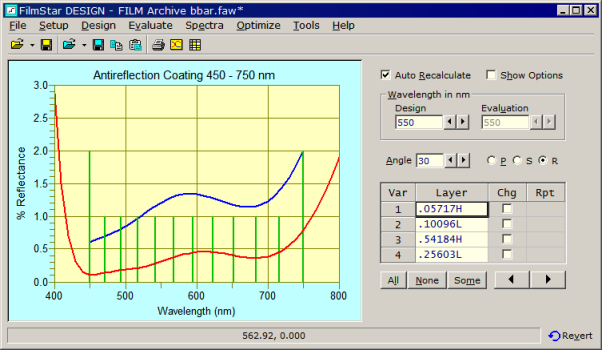
1. DESIGN 2.61.0100 adds the ability to edit and view (%R and %T) optimization targets in the Interactor. In addition, an imported spectrum (blue line) is retained in memory when closing and reopening the Interactor. Click Spectra...Clear Data to delete the line. (To test this function, click Spectra Copy followed by Paste. Modify the design to expose the blue line hidden under the red line.) 2. Advanced users: A Workbook menu command and toolbar icon have been added to the Interactor. To prevent unwanted results, only a few Workbook BASIC functions are available in Interactor mode: WbCopy, WbGetNum, WbGetText, WbRecalc. In the Interactor Options box, enable Workbook.. Auto-Update to automatically evaluate in the Workbook. Calculations occur before any BASIC macro runs, making it possible to utilize Workbook values in macros. 3. FTG-style file dialogs, an optional holdover from Windows 3.1 when only 8-character file names were allowed, have been eliminated in favor of standard Windows common dialogs. If you miss the 50-character descriptions that were part of FTG-style dialogs, check the following box
in File.. Configuration.. Preferences. Users can also utilize NTFS File Properties.
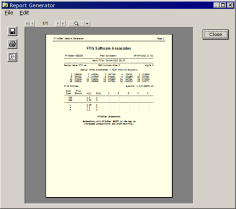
DESIGN 2.61.0300 and MEASURE (Scantraq) 2.61.0200 add Report Generator action command BASRUN. This makes it possible to run a BASIC macro while printing a report. Consider the following sample macro:
The macro is then referenced in the Report Generator template with BASTEXT and BASBLOCK as follows: <<Name Arial>><<Size 18>><<Align 1>><<Bold 1>> FTG Software Associates <<Name Courier New>><<Size 10>><<Bold 0>> <<Review>><<BasRun c:\Winfilm\Basic32\PrtStrings.bas>> <<Bold 1>><<Italic 1>> <<BasText 0>> <<BasBlock 1>>
Similar capabilities are provided in MONITOR
2.52.0200. Run-sheet commands BASTEXT/BASBLOCK, and BASIC Property
BasText$ are new in MONITOR. Although identical results can be obtained by
separately running a macro assigning BasText$ values, including the macro in
the run-sheet template eliminates an easily forgotten step. Finally, MONITOR
2.52.0200 adds BASIC Sub WsCopyAll, a subroutine which should prove
especially useful for integrating Excel calculations into run-sheets.
1. In a
previous FilmStar News we
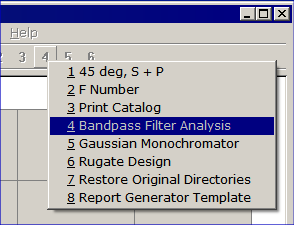
illustrated how popup menus can replace list boxes in assigning multiple
macros to a single key.
In response to a user who recently requested additional macro keys, it seemed useful to provide a new example (MselectPop.bas) in ..Winfilm\Basic32. BASIC updates are included in the most recent installer as well as in basic32.zip. While these examples utilize DESIGN, the same techniques work in INDEX, CRYSTAL, MONITOR, and MEASURE.
2. Isuzu Glass has a line of
optical filter
glasses which are popular in Japan.
Mr. M. Kobiyama has kindly
measured the filters and provided FTG Software with INDEX n,k data. Tables
have been added to the FilmStar installer. When updating FilmStar, select
'Complete FilmStar installation' and check DESIGN/INDEX in the 'Select
FilmStar Components' dialog. You will then have the option to install Isuzu
filter glass.
A FilmStar user at OIC 2010
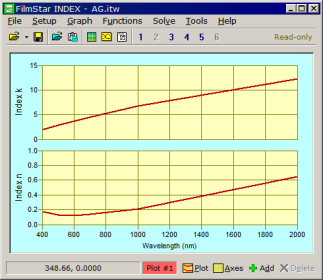
raised the following issue: How can a FILM Archive be protected against
another user changing referenced n,k files (*.itw)?
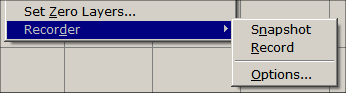
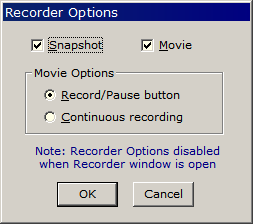
The Recording icon (green arrow) indicates that the Design Recorder is active; click Pause (yellow bars) to halt recording. The Display button (yellow arrow, but green in Continuous mode) displays the Recorder window without adding any designs. The Recorder works silently when minimized, and if closed while minimized (by right-clicking the taskbar icon or exiting DESIGN) it will be minimized when re-opened. The Windows taskbar indicates status when the Recorder is minimized.
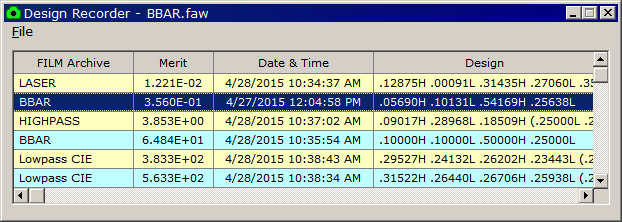
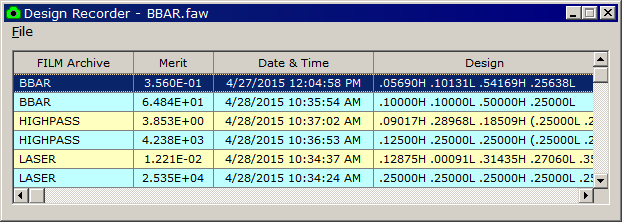
DESIGN 2.61.3721 (28 Apr 2015) added a FILM Archive column. As shown below, sorting only by Merit (click column header Merit) can be very confusing when the Recorder contains different designs.
Click header FILM Archive to sort by file name (primary sort) and merit (secondary sort). This change makes the Recorder far more useful.
Technical note: Design Recorder entries (Designs.txt) and associated FILM Archive
files (*.faw) are saved in ..\Winfilm\DesignCache. Should Recorder rows get
out-of-sync with .faw files, click File.. Clear All Rows to reset the
Recorder. DESIGN 2.61.3151 (18
Mar 2013) added continuous saving, thus minimizing sync errors previously
caused by computer failure while the Design Recorder window was open.
Note: The Design Recorder is
intended for backup during design development and is not a substitute for
File...Save As (main menu).
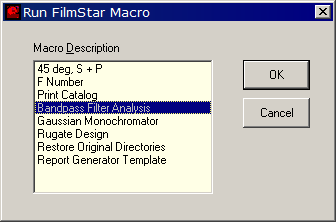
A Tools Menu macro typically includes BasOpen, BasRun or BasExec. The latter is especially useful for short BASIC programs. As illustrated, "Sub Main" and "End Sub" must not be included in the BasExec command. The pipe symbol "|" separates code lines. BasExec Dim a!|For a=0 To 45 Step 1|Angle=a|Calculate|Next a; 2. New BASIC Property Interactor provides means to set or determine Interactor status. This is useful for branching to different subroutines as follows: If Interactor Then DoThisCode Else DoOtherCode |




Copyright © 2023 FTG Software Associates
Last updated on
January 31, 2023